
Vendor onboarding
How to collect W-9s from subcontractors before payment gets held up
A W-9 should be a predictable onboarding step, not an emergency request when accounting is ready to pay.
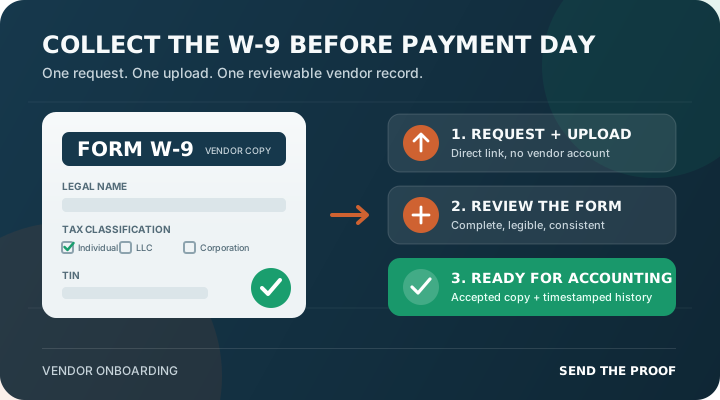
To collect W-9s from subcontractors reliably, request the form during onboarding and give each sub one secure place to upload it. Review the name and taxpayer identification number fields before approval, and keep the accepted copy with the vendor record. Do not wait until the first invoice is ready for payment.
A Form W-9 gives a requester the payee's legal name and taxpayer identification number (TIN) for information reporting. The IRS describes the form as the way a payee provides the correct TIN to a payer that may need to file an information return. For a general contractor, the operational goal is simple: collect a usable W-9 once, resolve obvious gaps early, and make it easy for accounting to find later.
Collect the W-9 before the first invoice enters the payment queue
The best trigger is vendor setup, not payment. Add the W-9 to the same pre-work requirement set as the certificate of insurance, license, and signed subcontract. That gives the subcontractor time to find the right form and gives your team time to correct it without turning the payment deadline into a paperwork chase.
Assign an owner to the requirement and define the gate in plain language: the vendor cannot be marked ready for payment until an acceptable W-9 is on file. If field operations, project management, and accounting all use the same status, nobody has to search email or ask whether someone else already collected it.
A complete W-9 needs more than a file named “W9.pdf”
Receiving a document is not the same as accepting it. Review the current form for obvious completeness and consistency before changing the requirement to approved. At minimum, the reviewer should look for:
- Legal name. Line 1 should identify the person or entity associated with the TIN.
- Business name. A trade name or disregarded entity name belongs on the separate business-name line when applicable.
- Federal tax classification. The vendor should select the classification that applies to them.
- Address. Accounting needs a usable mailing address for vendor and information-return records.
- TIN and certification. The relevant SSN or EIN field should be complete, and the certification should be signed when required.
- Legibility. Blurred photos, cropped pages, and password-protected files create a record your team may not be able to use.
Your team should check for missing or visibly inconsistent information, not guess at a vendor's tax classification. Route tax questions and name/TIN mismatch issues to the person responsible for information reporting. The IRS also offers a TIN Matching service for eligible payers and authorized agents that need to compare name and TIN combinations before filing.
Use a five-step W-9 collection workflow
- Create the requirement. Add “Current Form W-9” to the vendor's onboarding checklist and name the internal reviewer.
- Send a specific request. Tell the subcontractor what is needed, why it is needed, where to upload it, and the due date.
- Remind the right contact. Follow up with the owner, office manager, bookkeeper, or accountant who can actually complete the form.
- Review before approval. Check the submitted file against your written checklist, then approve it or return it with an exact reason.
- Preserve the record. Keep the accepted W-9, submission date, review decision, and later replacement together with the vendor history.
The IRS permits electronic submission systems for Forms W-9 when they meet its requirements. A W-9 can contain an SSN or EIN. Use an access-controlled collection method approved by your company instead of asking vendors to scatter tax forms across personal inboxes and text threads.
A clear request gets a faster response
Most late W-9s start with a vague message such as “send your paperwork.” Replace that with a request the subcontractor can finish in one sitting:
Subject: W-9 required for [Company Name] vendor setup
“We need a completed current Form W-9 for [Subcontractor Company] before your vendor setup is complete. Please upload the full, legible form using this secure link by [date]. Make sure the legal name, tax classification, address, TIN, and certification are complete. No account is required. If someone else handles tax forms, please forward this request or send us their contact information.”
This works because it names the document, ties it to a business milestone, identifies the fields that commonly cause rework, gives a deadline, and provides one action. A direct no-login upload link also avoids the account creation and password friction that can turn a two-minute task into a week of reminders.
Return bad forms with one exact correction request
“Rejected” is not useful by itself. If the page is cropped, say which portion is missing. If line 1 is blank, name the line. If the image is unreadable, ask for a full-resolution PDF or scan. Preserve the original submission and the reason it was returned so the next reviewer can see what happened.
If a subcontractor does not provide a TIN in the required manner, federal backup-withholding rules may apply to reportable payments. The IRS currently states a 24% backup withholding rate and warns that a payer can become liable for amounts it failed to withhold when required. That is an accounting and tax decision—not something a project team should improvise—so establish an escalation path before a missing W-9 reaches payment day.
One vendor record removes the W-9 chase from future projects
A repeatable process turns the W-9 from an inbox scavenger hunt into a visible onboarding requirement. Project teams can see that the document is missing, accounting can find the accepted copy, and managers can see who requested, submitted, reviewed, or returned it. When the vendor sends a corrected form later, the replacement belongs in the same history instead of overwriting the only evidence of what changed.
Send The Proof lets general contractors request W-9s alongside COIs, licenses, and project-specific documents through a no-login vendor upload link. The first five vendors are free, so a team can test the workflow with real subcontractors before moving the rest of its vendor list.
Build the full process with the subcontractor onboarding workflow, see how a no-login vendor portal reduces upload friction, and use the subcontractor compliance checklist to define the rest of your pre-work requirements.